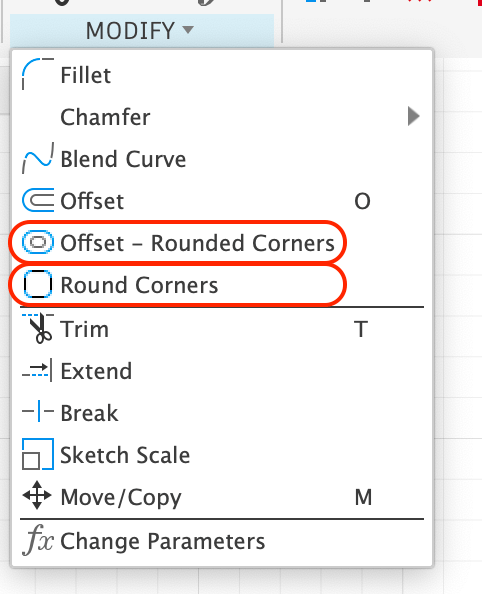
Fusion already has a built-in Offset command, but it explictly creates sharp corner offsets. Rounded Corners works simlar, but rounds the corners when it does the offset.
You can input a positive (outward) direction or negative (inward) direction and optionally delete the original curve. For multiple curves, each chained curve is operated on seperately.
A “group offset” option may be added later.
Example input
Example result
Was this page helpful?
{"docsConfig":{"theme":"mint","$schema":"https://mintlify.com/docs.json","name":"VBit Inlay Documentation","colors":{"primary":"#393939","light":"#FF0000","dark":"#006FFE"},"logo":{"light":"https://mintcdn.com/corbinsworkshop/Ab0-S0ujCwJvGV5_/logo/corbins_workshop_rectangle_logo.svg?fit=max\u0026auto=format\u0026n=Ab0-S0ujCwJvGV5_\u0026q=85\u0026s=f18aedd07c435bde309bb617eb7040c5","dark":"https://mintcdn.com/corbinsworkshop/Ab0-S0ujCwJvGV5_/logo/corbins_workshop_rectangle_logo.svg?fit=max\u0026auto=format\u0026n=Ab0-S0ujCwJvGV5_\u0026q=85\u0026s=f18aedd07c435bde309bb617eb7040c5","href":"https://www.corbinsworkshop.com"},"favicon":"","appearance":{"default":"light","strict":true},"navbar":{"links":[{"href":"mailto:corbin@corbinsworkshop.com","label":"Support Email"}],"primary":{"type":"button","label":"Back to Corbin's Workshop","href":"https://www.corbinsworkshop.com"}},"footer":{},"styling":{"eyebrows":"breadcrumbs","latex":false},"navigation":{"pages":[]}},"deployment":{"deploymentMetadataValue":{"subdomain":"corbinsworkshop","hasAudioNarration":false,"actualSubdomain":"corbinsworkshop","customDomains":["docs.corbinsworkshop.com"],"gitSource":{"type":"github","owner":"corbinstreehouse","repo":"vbitinlay_documentation","deployBranch":"master","contentDirectory":"","isPrivate":false,"mountPath":"","label":"","_id":"6ada47257588e31a4b6faa25"},"feedback":{"thumbs":true},"entitlements":{},"buildId":"6ae4a731a3eed560d7e553f0","clientVersion":"0.0.4088","searchFilterCounts":[{"language":"default","tag":"VBit Inlay Documentation","count":29},{"language":"default","tag":"VBit Inlay / VCarve Command","count":11},{"language":"default","tag":"Other","count":5},{"language":"default","tag":"Sketch Editing Commands","count":5},{"language":"default","tag":"Get Started","count":4},{"language":"default","tag":"Manufacturing Setups","count":4},{"language":"default","tag":"Toolpaths","count":3},{"language":"default","tag":"Design Elements","count":2},{"language":"default","tag":"Inlay Fit","count":2},{"language":"default","tag":"Learn","count":2}]},"assistantConfig":{"enableAskAiButton":false,"enableStarterQuestions":false,"enableAskAiSearchBar":true},"basePath":"","hasChatPermissions":false,"hasWebMcpPermissions":false,"toggles":[{"name":"kill-isr","enabled":true,"variant":{"name":"disabled","enabled":false,"feature_enabled":true},"impressionData":false},{"name":"agent-mintlify-slack","enabled":true,"variant":{"name":"disabled","enabled":false,"feature_enabled":true},"impressionData":false},{"name":"agent-integrations-settings","enabled":true,"variant":{"name":"disabled","enabled":false,"feature_enabled":true},"impressionData":false},{"name":"rbac-expansion","enabled":true,"variant":{"name":"disabled","enabled":false,"feature_enabled":true},"impressionData":false},{"name":"automations-pr-grouping","enabled":true,"variant":{"name":"disabled","enabled":false,"feature_enabled":true},"impressionData":false},{"name":"custom-prefix","enabled":true,"variant":{"name":"disabled","enabled":false,"feature_enabled":true},"impressionData":false},{"name":"analytics-v7","enabled":true,"variant":{"name":"disabled","enabled":false,"feature_enabled":true},"impressionData":false},{"name":"user-flows-analytics","enabled":true,"variant":{"name":"disabled","enabled":false,"feature_enabled":true},"impressionData":false},{"name":"no-publish-flow","enabled":true,"variant":{"name":"disabled","enabled":false,"feature_enabled":true},"impressionData":false},{"name":"workos-onboarding","enabled":true,"variant":{"name":"disabled","enabled":false,"feature_enabled":true},"impressionData":false},{"name":"llms-txt-v2","enabled":true,"variant":{"name":"disabled","enabled":false,"feature_enabled":true},"impressionData":false},{"name":"snapshot-serving-live","enabled":true,"variant":{"name":"disabled","enabled":false,"feature_enabled":true},"impressionData":false},{"name":"stripTemperatureMiddleware","enabled":true,"variant":{"name":"disabled","enabled":false,"feature_enabled":true},"impressionData":false},{"name":"support-platform-pylon-zendesk","enabled":true,"variant":{"name":"disabled","enabled":false,"feature_enabled":true},"impressionData":false},{"name":"snapshot-serving","enabled":true,"variant":{"name":"disabled","enabled":false,"feature_enabled":true},"impressionData":false},{"name":"instant-rollback","enabled":true,"variant":{"name":"disabled","enabled":false,"feature_enabled":true},"impressionData":false},{"name":"granular-notifications-server","enabled":true,"variant":{"name":"disabled","enabled":false,"feature_enabled":true},"impressionData":false},{"name":"granular-notifications","enabled":true,"variant":{"name":"disabled","enabled":false,"feature_enabled":true},"impressionData":false},{"name":"automations-fable","enabled":true,"variant":{"name":"disabled","enabled":false,"feature_enabled":true},"impressionData":false},{"name":"fixed-ai-action-pricing","enabled":true,"variant":{"name":"disabled","enabled":false,"feature_enabled":true},"impressionData":false},{"name":"automation-resolve-merge-conflict","enabled":true,"variant":{"name":"disabled","enabled":false,"feature_enabled":true},"impressionData":false},{"name":"scoped-publishing","enabled":true,"variant":{"name":"disabled","enabled":false,"feature_enabled":true},"impressionData":false},{"name":"mintql","enabled":true,"variant":{"name":"disabled","enabled":false,"feature_enabled":true},"impressionData":false},{"name":"page-level-analytics","enabled":true,"variant":{"name":"disabled","enabled":false,"feature_enabled":true},"impressionData":false},{"name":"editor-version-history-v2","enabled":true,"variant":{"name":"disabled","enabled":false,"feature_enabled":true},"impressionData":false},{"name":"billing-page-v2","enabled":true,"variant":{"name":"disabled","enabled":false,"feature_enabled":true},"impressionData":false},{"name":"full-page-search","enabled":true,"variant":{"name":"disabled","enabled":false,"feature_enabled":true},"impressionData":false},{"name":"workspace-projects","enabled":true,"variant":{"name":"disabled","enabled":false,"feature_enabled":true},"impressionData":false},{"name":"assistant-v5","enabled":true,"variant":{"name":"disabled","enabled":false,"feature_enabled":true},"impressionData":false},{"name":"fork-pr-previews","enabled":true,"variant":{"name":"disabled","enabled":false,"feature_enabled":true},"impressionData":false},{"name":"revalidation-jwt","enabled":true,"variant":{"name":"disabled","enabled":false,"feature_enabled":true},"impressionData":false},{"name":"workos-sso-scim","enabled":true,"variant":{"name":"disabled","enabled":false,"feature_enabled":true},"impressionData":false},{"name":"hobby-abuse-scan","enabled":true,"variant":{"name":"disabled","enabled":false,"feature_enabled":true},"impressionData":false},{"name":"dashboard-inbox","enabled":true,"variant":{"name":"disabled","enabled":false,"feature_enabled":true},"impressionData":false},{"name":"workos-signup","enabled":true,"variant":{"name":"disabled","enabled":false,"feature_enabled":true},"impressionData":false},{"name":"turbopuffer-dual-write","enabled":true,"variant":{"name":"disabled","enabled":false,"feature_enabled":true},"impressionData":false},{"name":"workos-enabled","enabled":true,"variant":{"name":"disabled","enabled":false,"feature_enabled":true},"impressionData":false},{"name":"approve-review-flow","enabled":true,"variant":{"name":"disabled","enabled":false,"feature_enabled":true},"impressionData":false},{"name":"editor-metadata","enabled":true,"variant":{"name":"disabled","enabled":false,"feature_enabled":true},"impressionData":false},{"name":"sso-setup-deadline-banner","enabled":true,"variant":{"name":"disabled","enabled":false,"feature_enabled":true},"impressionData":false},{"name":"turbopuffer-serve","enabled":true,"variant":{"name":"disabled","enabled":false,"feature_enabled":true},"impressionData":false},{"name":"live-agents","enabled":true,"variant":{"name":"disabled","enabled":false,"feature_enabled":true},"impressionData":false},{"name":"comment-mode","enabled":true,"variant":{"name":"disabled","enabled":false,"feature_enabled":true},"impressionData":false}],"googleFontsInlined":false},"customCss":[{"filePath":"style.css","content":"#navbar a[href*=\"corbinsworkshop.com\"] img,#navbar img.nav-logo{height:3rem;width:auto}"}],"page":{"pagePath":"round_offset_command","slug":"/round_offset_command","pageMetadata":{"title":"Offset - Round Corners","tag":"New!","description":null,"href":"/round_offset_command"},"pageType":"default","mdx":{"mdxSource":{"compiledSource":"\"use strict\";const{Fragment:_Fragment,jsx:_jsx,jsxs:_jsxs}=arguments[0];const{useMDXComponents:_provideComponents}=arguments[0];function _createMdxContent(props){const _components={p:`p`,strong:`strong`,..._provideComponents(),...props.components},{Columns,Frame,Heading,Note,OptimizedImage}=_components;if(!Columns)_missingMdxReference(`Columns`,true);if(!Frame)_missingMdxReference(`Frame`,true);if(!Heading)_missingMdxReference(`Heading`,true);if(!Note)_missingMdxReference(`Note`,true);if(!OptimizedImage)_missingMdxReference(`OptimizedImage`,true);return _jsxs(_Fragment,{children:[_jsx(_components.p,{children:`This only shows up in the Sketch environment. When you are actively editing a sketch, the Modify drop down will have two new commands:`}),`\n`,_jsx(Frame,{children:_jsx(OptimizedImage,{src:`https://mintcdn.com/corbinsworkshop/aMltVVTTfyQEbQNh/images/round_corners/sketch_env_commands.png?fit=max\u0026auto=format\u0026n=aMltVVTTfyQEbQNh\u0026q=85\u0026s=85bb7465818472b9ef77b276f6cfe678`,alt:`Feature tab`,className:`mint-block mint-mx-auto mint-h-[297px] mint-rounded-lg`,\"data-og-width\":`482`,width:`482`,\"data-og-height\":`594`,height:`594`,\"data-path\":`images/round_corners/sketch_env_commands.png`,\"data-optimize\":`true`,\"data-opv\":`3`,srcset:`https://mintcdn.com/corbinsworkshop/aMltVVTTfyQEbQNh/images/round_corners/sketch_env_commands.png?w=280\u0026fit=max\u0026auto=format\u0026n=aMltVVTTfyQEbQNh\u0026q=85\u0026s=da228e6c007865babf5eb1b6354059d1 280w, https://mintcdn.com/corbinsworkshop/aMltVVTTfyQEbQNh/images/round_corners/sketch_env_commands.png?w=560\u0026fit=max\u0026auto=format\u0026n=aMltVVTTfyQEbQNh\u0026q=85\u0026s=5bcd696ce61f4a6afc54ae2e36fbd87d 560w, https://mintcdn.com/corbinsworkshop/aMltVVTTfyQEbQNh/images/round_corners/sketch_env_commands.png?w=840\u0026fit=max\u0026auto=format\u0026n=aMltVVTTfyQEbQNh\u0026q=85\u0026s=d4df3479c29c68ec82cbc6fa016933d4 840w, https://mintcdn.com/corbinsworkshop/aMltVVTTfyQEbQNh/images/round_corners/sketch_env_commands.png?w=1100\u0026fit=max\u0026auto=format\u0026n=aMltVVTTfyQEbQNh\u0026q=85\u0026s=5b92d6c7bc48d1a54e480b84e3cfe2c4 1100w, https://mintcdn.com/corbinsworkshop/aMltVVTTfyQEbQNh/images/round_corners/sketch_env_commands.png?w=1650\u0026fit=max\u0026auto=format\u0026n=aMltVVTTfyQEbQNh\u0026q=85\u0026s=68ba7deb5d64a40069d8f6f01d7879e4 1650w, https://mintcdn.com/corbinsworkshop/aMltVVTTfyQEbQNh/images/round_corners/sketch_env_commands.png?w=2500\u0026fit=max\u0026auto=format\u0026n=aMltVVTTfyQEbQNh\u0026q=85\u0026s=8d6220486c17014c5da46672a62d6080 2500w`})}),`\n`,_jsx(Heading,{level:`3`,id:`offset-rounded-corners`,children:`Offset - Rounded Corners`}),`\n`,_jsxs(_components.p,{children:[`Fusion already has a built-in Offset command, but it explictly creates sharp corner offsets. `,_jsx(_components.strong,{children:`Rounded Corners`}),` works simlar, but rounds the corners when it does the offset.`]}),`\n`,_jsx(Frame,{children:_jsx(OptimizedImage,{src:`https://mintcdn.com/corbinsworkshop/aMltVVTTfyQEbQNh/images/round_corners/offset_rounded_corners.png?fit=max\u0026auto=format\u0026n=aMltVVTTfyQEbQNh\u0026q=85\u0026s=91b8dc50d1bbb43ea910cb472cc6c24c`,alt:`Feature tab`,className:`mint-block mint-mx-auto mint-h-[223px] mint-rounded-lg`,\"data-og-width\":`586`,width:`586`,\"data-og-height\":`446`,height:`446`,\"data-path\":`images/round_corners/offset_rounded_corners.png`,\"data-optimize\":`true`,\"data-opv\":`3`,srcset:`https://mintcdn.com/corbinsworkshop/aMltVVTTfyQEbQNh/images/round_corners/offset_rounded_corners.png?w=280\u0026fit=max\u0026auto=format\u0026n=aMltVVTTfyQEbQNh\u0026q=85\u0026s=43bf10cacfa10093669b148f918be9e6 280w, https://mintcdn.com/corbinsworkshop/aMltVVTTfyQEbQNh/images/round_corners/offset_rounded_corners.png?w=560\u0026fit=max\u0026auto=format\u0026n=aMltVVTTfyQEbQNh\u0026q=85\u0026s=4d28127304e38a8cd22ad29a2d422391 560w, https://mintcdn.com/corbinsworkshop/aMltVVTTfyQEbQNh/images/round_corners/offset_rounded_corners.png?w=840\u0026fit=max\u0026auto=format\u0026n=aMltVVTTfyQEbQNh\u0026q=85\u0026s=3560e1069fc975b9f3f4e0ce1a8b63f9 840w, https://mintcdn.com/corbinsworkshop/aMltVVTTfyQEbQNh/images/round_corners/offset_rounded_corners.png?w=1100\u0026fit=max\u0026auto=format\u0026n=aMltVVTTfyQEbQNh\u0026q=85\u0026s=d93c6660b307c4bc3123741757d9f323 1100w, https://mintcdn.com/corbinsworkshop/aMltVVTTfyQEbQNh/images/round_corners/offset_rounded_corners.png?w=1650\u0026fit=max\u0026auto=format\u0026n=aMltVVTTfyQEbQNh\u0026q=85\u0026s=5147533a5fa0becd3194554d6bad5505 1650w, https://mintcdn.com/corbinsworkshop/aMltVVTTfyQEbQNh/images/round_corners/offset_rounded_corners.png?w=2500\u0026fit=max\u0026auto=format\u0026n=aMltVVTTfyQEbQNh\u0026q=85\u0026s=aab859ca09cd137a0bb55afd74572d44 2500w`})}),`\n`,_jsx(_components.p,{children:`You can input a positive (outward) direction or negative (inward) direction and optionally delete the original curve. For multiple curves, each chained curve is operated on seperately.`}),`\n`,_jsx(Note,{children:_jsx(_components.p,{children:`A “group offset” option may be added later.`})}),`\n`,_jsxs(Columns,{cols:2,children:[_jsx(Frame,{caption:`Example input`,children:_jsx(OptimizedImage,{src:`https://mintcdn.com/corbinsworkshop/aMltVVTTfyQEbQNh/images/round_corners/offset_rounded_corners_example.png?fit=max\u0026auto=format\u0026n=aMltVVTTfyQEbQNh\u0026q=85\u0026s=31cc2ebdb644901e5c0d3e450ad5701f`,alt:`Feature tab`,className:`mint-block mint-mx-auto mint-rounded-lg`,\"data-og-width\":`1298`,width:`1298`,\"data-og-height\":`830`,height:`830`,\"data-path\":`images/round_corners/offset_rounded_corners_example.png`,\"data-optimize\":`true`,\"data-opv\":`3`,srcset:`https://mintcdn.com/corbinsworkshop/aMltVVTTfyQEbQNh/images/round_corners/offset_rounded_corners_example.png?w=280\u0026fit=max\u0026auto=format\u0026n=aMltVVTTfyQEbQNh\u0026q=85\u0026s=93744f342aa81f9edae6a9c29e759f57 280w, https://mintcdn.com/corbinsworkshop/aMltVVTTfyQEbQNh/images/round_corners/offset_rounded_corners_example.png?w=560\u0026fit=max\u0026auto=format\u0026n=aMltVVTTfyQEbQNh\u0026q=85\u0026s=5417d25a21e67d64b8ca71a324c0ec8d 560w, https://mintcdn.com/corbinsworkshop/aMltVVTTfyQEbQNh/images/round_corners/offset_rounded_corners_example.png?w=840\u0026fit=max\u0026auto=format\u0026n=aMltVVTTfyQEbQNh\u0026q=85\u0026s=621b3ad78db793470a36f2edc8adf8d5 840w, https://mintcdn.com/corbinsworkshop/aMltVVTTfyQEbQNh/images/round_corners/offset_rounded_corners_example.png?w=1100\u0026fit=max\u0026auto=format\u0026n=aMltVVTTfyQEbQNh\u0026q=85\u0026s=11d5568bd9a3f9e75a5431c38ac8ad49 1100w, https://mintcdn.com/corbinsworkshop/aMltVVTTfyQEbQNh/images/round_corners/offset_rounded_corners_example.png?w=1650\u0026fit=max\u0026auto=format\u0026n=aMltVVTTfyQEbQNh\u0026q=85\u0026s=d62d74cd7e4cd741bc95fbd2d716c451 1650w, https://mintcdn.com/corbinsworkshop/aMltVVTTfyQEbQNh/images/round_corners/offset_rounded_corners_example.png?w=2500\u0026fit=max\u0026auto=format\u0026n=aMltVVTTfyQEbQNh\u0026q=85\u0026s=a4421df5c3a60f1c88830f4155d4e9a2 2500w`})}),_jsx(Frame,{caption:`Example result`,children:_jsx(OptimizedImage,{src:`https://mintcdn.com/corbinsworkshop/aMltVVTTfyQEbQNh/images/round_corners/offset_rounded_corners_example_result.png?fit=max\u0026auto=format\u0026n=aMltVVTTfyQEbQNh\u0026q=85\u0026s=e181f291ff02d1aa8c655c00bb1c2e4f`,alt:`Feature tab`,className:`mint-block mint-mx-auto mint-rounded-lg`,\"data-og-width\":`1004`,width:`1004`,\"data-og-height\":`958`,height:`958`,\"data-path\":`images/round_corners/offset_rounded_corners_example_result.png`,\"data-optimize\":`true`,\"data-opv\":`3`,srcset:`https://mintcdn.com/corbinsworkshop/aMltVVTTfyQEbQNh/images/round_corners/offset_rounded_corners_example_result.png?w=280\u0026fit=max\u0026auto=format\u0026n=aMltVVTTfyQEbQNh\u0026q=85\u0026s=8cd93fb681e96ea4864fbf12208ab304 280w, https://mintcdn.com/corbinsworkshop/aMltVVTTfyQEbQNh/images/round_corners/offset_rounded_corners_example_result.png?w=560\u0026fit=max\u0026auto=format\u0026n=aMltVVTTfyQEbQNh\u0026q=85\u0026s=81d769055b8ff1ba5243564f95f547d3 560w, https://mintcdn.com/corbinsworkshop/aMltVVTTfyQEbQNh/images/round_corners/offset_rounded_corners_example_result.png?w=840\u0026fit=max\u0026auto=format\u0026n=aMltVVTTfyQEbQNh\u0026q=85\u0026s=11504fc01cc43d1a329e95624d41436f 840w, https://mintcdn.com/corbinsworkshop/aMltVVTTfyQEbQNh/images/round_corners/offset_rounded_corners_example_result.png?w=1100\u0026fit=max\u0026auto=format\u0026n=aMltVVTTfyQEbQNh\u0026q=85\u0026s=c0554d780a7c10281cf70dfc5a4f86e0 1100w, https://mintcdn.com/corbinsworkshop/aMltVVTTfyQEbQNh/images/round_corners/offset_rounded_corners_example_result.png?w=1650\u0026fit=max\u0026auto=format\u0026n=aMltVVTTfyQEbQNh\u0026q=85\u0026s=7e2d5b1c96928801a2d485a8e129c753 1650w, https://mintcdn.com/corbinsworkshop/aMltVVTTfyQEbQNh/images/round_corners/offset_rounded_corners_example_result.png?w=2500\u0026fit=max\u0026auto=format\u0026n=aMltVVTTfyQEbQNh\u0026q=85\u0026s=65bf6c2e676fd41273c47986a2159b21 2500w`})})]})]})}function MDXContent(props={}){const{wrapper:MDXLayout}={..._provideComponents(),...props.components};return MDXLayout?_jsx(MDXLayout,{...props,children:_jsx(_createMdxContent,{...props})}):_createMdxContent(props)}return{default:MDXContent};function _missingMdxReference(id,component){throw new Error(`Expected `+(component?`component`:`object`)+\" `\"+id+\"` to be defined: you likely forgot to import, pass, or provide it.\")}","frontmatter":{},"scope":{"config":{},"pageMetadata":{"title":"Offset - Round Corners","tag":"New!","description":null,"href":"/round_offset_command"}}},"mdxSourceWithNoJs":null},"mdxExtracts":{"tableOfContents":[{"title":"Offset - Rounded Corners","slug":"offset-rounded-corners","depth":3,"children":[]}],"codeExamples":{}},"jsLinks":[],"dynamicCss":".mint-mx-auto {\n margin-left: auto;\n margin-right: auto\n}\n.mint-block {\n display: block\n}\n.mint-h-\\[223px\\] {\n height: 223px\n}\n.mint-h-\\[297px\\] {\n height: 297px\n}\n.mint-rounded-lg {\n border-radius: 0.5rem\n}","subdomain":"corbinsworkshop","siteName":"VBit Inlay Documentation","title":"Offset - Round Corners - VBit Inlay Documentation","navMaps":{"firstHrefInVersion":{},"firstHrefInLanguage":{}},"lastModified":"2026-10-26T17:50:23.614Z","originalFileLocation":"round_offset_command.mdx"},"headHtml":"\u003cscript data-mint-head>(function(){var d=document.documentElement,p=\"light\";if(!p){try{p=localStorage.getItem(\"isDarkMode\")}catch(e){}if(p==='true')p='dark';else if(p==='false')p='light';if(p!=='light'\u0026\u0026p!=='dark'\u0026\u0026p!=='system')p=\"light\"}var r=p==='system'?(matchMedia(\"(prefers-color-scheme: dark)\").matches?'dark':'light'):p;d.classList.remove(r==='dark'?'light':'dark');d.classList.add(r);d.setAttribute(\"data-theme-preference\",p)})();\u003c/script>\u003cmeta data-mint-head name=\"application-name\" content=\"VBit Inlay Documentation\">\u003cmeta data-mint-head name=\"generator\" content=\"Mintlify\">\u003clink data-mint-head rel=\"apple-touch-icon\" type=\"image/png\" sizes=\"180x180\" href=\"https://mintlify.s3.us-west-1.amazonaws.com/corbinsworkshop/_generated/favicon/apple-touch-icon.png?v=3\">\u003clink data-mint-head rel=\"icon\" type=\"image/png\" sizes=\"32x32\" href=\"https://mintlify.s3.us-west-1.amazonaws.com/corbinsworkshop/_generated/favicon/favicon-32x32.png?v=3\">\u003clink data-mint-head rel=\"icon\" type=\"image/png\" sizes=\"16x16\" href=\"https://mintlify.s3.us-west-1.amazonaws.com/corbinsworkshop/_generated/favicon/favicon-16x16.png?v=3\">\u003clink data-mint-head rel=\"shortcut icon\" type=\"image/x-icon\" href=\"https://mintlify.s3.us-west-1.amazonaws.com/corbinsworkshop/_generated/favicon/favicon.ico?v=3\">\u003cmeta data-mint-head property=\"og:title\" content=\"Offset - Round Corners - VBit Inlay Documentation\">\u003cmeta data-mint-head property=\"og:site_name\" content=\"VBit Inlay Documentation\">\u003cmeta data-mint-head property=\"og:url\" content=\"https://docs.corbinsworkshop.com/round_offset_command\">\u003cmeta data-mint-head property=\"og:type\" content=\"website\">\u003cmeta data-mint-head property=\"og:image\" content=\"https://corbinsworkshop.mintlify.site/_mintlify/api/og/v2?division=Sketch+Editing+Commands\u0026amp;title=Offset+-+Round+Corners\u0026amp;theme=3d128484cf8722792363a5d3\u0026amp;signature=317e768898be21ace963038bccdfcf92d7b4a91a49adcedd8736d551a4dad885\">\u003cmeta data-mint-head property=\"og:image:width\" content=\"1200\">\u003cmeta data-mint-head property=\"og:image:height\" content=\"630\">\u003cmeta data-mint-head name=\"twitter:card\" content=\"summary_large_image\">\u003cmeta data-mint-head name=\"twitter:title\" content=\"Offset - Round Corners - VBit Inlay Documentation\">\u003cmeta data-mint-head name=\"twitter:image\" content=\"https://corbinsworkshop.mintlify.site/_mintlify/api/og/v2?division=Sketch+Editing+Commands\u0026amp;title=Offset+-+Round+Corners\u0026amp;theme=3d128484cf8722792363a5d3\u0026amp;signature=317e768898be21ace963038bccdfcf92d7b4a91a49adcedd8736d551a4dad885\">\u003cmeta data-mint-head name=\"twitter:image:width\" content=\"1200\">\u003cmeta data-mint-head name=\"twitter:image:height\" content=\"630\">\u003cmeta data-mint-head name=\"msapplication-config\" content=\"https://mintlify.s3.us-west-1.amazonaws.com/corbinsworkshop/_generated/favicon/browserconfig.xml?v=3\">\u003cmeta data-mint-head name=\"apple-mobile-web-app-title\" content=\"VBit Inlay Documentation\">\u003cmeta data-mint-head name=\"msapplication-TileColor\" content=\"#393939\">\u003clink data-mint-head rel=\"canonical\" href=\"https://docs.corbinsworkshop.com/round_offset_command\">\u003clink data-mint-head rel=\"alternate\" type=\"application/xml\" href=\"/sitemap.xml\">\u003clink data-mint-head rel=\"alternate\" type=\"text/markdown\" href=\"/round_offset_command.md\">\u003cscript data-mint-head type=\"application/ld+json\">{\"@context\":\"https://schema.org\",\"@graph\":[{\"@type\":\"Organization\",\"@id\":\"https://docs.corbinsworkshop.com/#organization\",\"name\":\"VBit Inlay Documentation\",\"url\":\"https://docs.corbinsworkshop.com\",\"logo\":{\"@type\":\"ImageObject\",\"url\":\"https://mintcdn.com/corbinsworkshop/Ab0-S0ujCwJvGV5_/logo/corbins_workshop_rectangle_logo.svg?fit=max\u0026auto=format\u0026n=Ab0-S0ujCwJvGV5_\u0026q=85\u0026s=f18aedd07c435bde309bb617eb7040c5\"}},{\"@type\":\"WebSite\",\"@id\":\"https://docs.corbinsworkshop.com#website\",\"name\":\"VBit Inlay Documentation\",\"url\":\"https://docs.corbinsworkshop.com\",\"publisher\":{\"@id\":\"https://docs.corbinsworkshop.com/#organization\"}},{\"@type\":\"WebPage\",\"@id\":\"https://docs.corbinsworkshop.com/round_offset_command#webpage\",\"url\":\"https://docs.corbinsworkshop.com/round_offset_command\",\"name\":\"Offset - Round Corners\",\"dateModified\":\"2026-10-26T17:50:23.614Z\",\"isPartOf\":{\"@id\":\"https://docs.corbinsworkshop.com#website\"},\"breadcrumb\":{\"@id\":\"https://docs.corbinsworkshop.com/round_offset_command#breadcrumb\"}},{\"@type\":\"BreadcrumbList\",\"@id\":\"https://docs.corbinsworkshop.com/round_offset_command#breadcrumb\",\"itemListElement\":[{\"@type\":\"ListItem\",\"position\":1,\"name\":\"Sketch Editing Commands\",\"item\":\"https://docs.corbinsworkshop.com/sketch_commands_overview\"},{\"@type\":\"ListItem\",\"position\":2,\"name\":\"Offset - Round Corners\",\"item\":\"https://docs.corbinsworkshop.com/round_offset_command\"}]},{\"@type\":[\"Article\",\"TechArticle\"],\"@id\":\"https://docs.corbinsworkshop.com/round_offset_command#article\",\"headline\":\"Offset - Round Corners\",\"name\":\"Offset - Round Corners\",\"url\":\"https://docs.corbinsworkshop.com/round_offset_command\",\"mainEntityOfPage\":{\"@id\":\"https://docs.corbinsworkshop.com/round_offset_command#webpage\"},\"dateModified\":\"2026-10-26T17:50:23.614Z\",\"publisher\":{\"@id\":\"https://docs.corbinsworkshop.com/#organization\"},\"isPartOf\":{\"@id\":\"https://docs.corbinsworkshop.com#website\"}}]}\u003c/script>\u003cscript data-mint-head type=\"application/ld+json\">{\"@context\":\"https://schema.org\",\"@type\":\"WebSite\",\"name\":\"VBit Inlay Documentation\",\"creator\":{\"@type\":\"Organization\",\"name\":\"Mintlify\",\"url\":\"https://mintlify.com\"}}\u003c/script>","siteName":"VBit Inlay Documentation","nav":{"global":null,"tabs":[{"tab":"VBit Inlay Documentation","groups":[{"group":"Get Started","pages":[{"title":"Introduction","href":""},{"title":"Installation","href":"/installation"},{"title":"Quickstart","href":"/quickstart"},{"title":"Video References","href":"/video_references"}]},{"group":"Learn","pages":[{"title":"Terminology","href":"/terminology"},{"title":"Vector Design","href":"/vector_design"}]},{"group":"VBit Inlay / VCarve Command","pages":[{"title":"Running","href":"/vbit_inlay_running"},{"title":"Feature Tab","href":"/vbit_inlay_feature_tab"},{"group":"Toolpaths","expanded":true,"pages":[{"title":"Toolpaths Tab","href":"/vbit_inlay_toolpaths_tab"},{"title":"Adding Document Bits","href":"/adding_document_bits"},{"title":"VBit Selection","href":"/vbit_selection"}]},{"group":"Design Elements","expanded":true,"pages":[{"title":"Design Components","href":"/design-components"},{"title":"Parameters","href":"/parameters"}]},{"group":"Manufacturing Setups","expanded":true,"pages":[{"title":"Pocket Setup - 2D","href":"/pocket-setup-2d"},{"title":"Plug Setup - 2D","href":"/plug-setup-2d"},{"title":"Pocket Setup - 3D","href":"/pocket-setup-3d"},{"title":"Plug Setup - 3D","href":"/plug-setup-3d"}]}]},{"group":"Inlay Fit","pages":[{"title":"Inlay Fit Adjustment","icon":"star","href":"/inlay_fit_adjustment"},{"title":"3D Inlays / Extreme Angles / Machinability","href":"/machinability_3d"}]},{"group":"Sketch Editing Commands","pages":[{"title":"Overview","description":null,"href":"/sketch_commands_overview"},{"title":"Offset - Round Corners","tag":"New!","href":"/round_offset_command"},{"title":"Round Corners","tag":"New!","description":null,"href":"/round_corners_command"},{"title":"Round All Corners","tag":"New!","href":"/round_all_corners_command"},{"title":"Behavior Notes","href":"/round_corners_behavior"}]},{"group":"Other","pages":[{"title":"Organization Recommendations","href":"/organization_recs"},{"title":"Known Parameter List","href":"/known_parameter_list"},{"title":"Known Bugs / Issues","href":"/known_bugs"},{"title":"Bug Reports","href":"/bug-reports"},{"title":"Release Notes","href":"/release_notes"}]}]}]},"basePath":"","title":"Offset - Round Corners - VBit Inlay Documentation","buildId":"dpl_DTau1J5HqS9UTgVSDwGksstFWtPa","deploymentId":"dpl_DTau1J5HqS9UTgVSDwGksstFWtPa","dynamics":["07c022d89b","a74be98ba7"],"chunks":["Frame-DvzxQbD0.js","DynamicMarkdown-mQG_iQiE.js","zoom-image-lightbox-BFbLClTf.js","lightbox-handle-r17bVUz3.js"]}